If you are a student, a teacher, or an HR professional, you already know that attendance percentage is one of the most tracked numbers in any institution. Knowing how to calculate attendance percentage correctly saves you from confusion, missed exams, and salary deductions. The good news is that the formula is simple and once you understand it, you will never struggle with it again.
This guide covers everything about how to calculate attendance percentage from the basic formula to practical examples, keyboard shortcuts in Excel, and reverse calculations for finding minimum required days.
What is attendance percentage
Attendance percentage is the ratio of the number of days or classes you were present divided by the total number of days or classes held. This ratio is then converted to a percentage by multiplying it by 100. It is used in schools, colleges, universities and offices to measure how consistently a person showed up during a given time period.
How to calculate attendance percentage: the main formula
The core formula for how to calculate attendance percentage is as follows. You divide the number of days present by the total working days and then multiply the result by 100. This gives you the attendance percentage for any time period whether it is a week, a month, a semester or a full year.
Attendance Percentage = (Days Present / Total Working Days) x 100
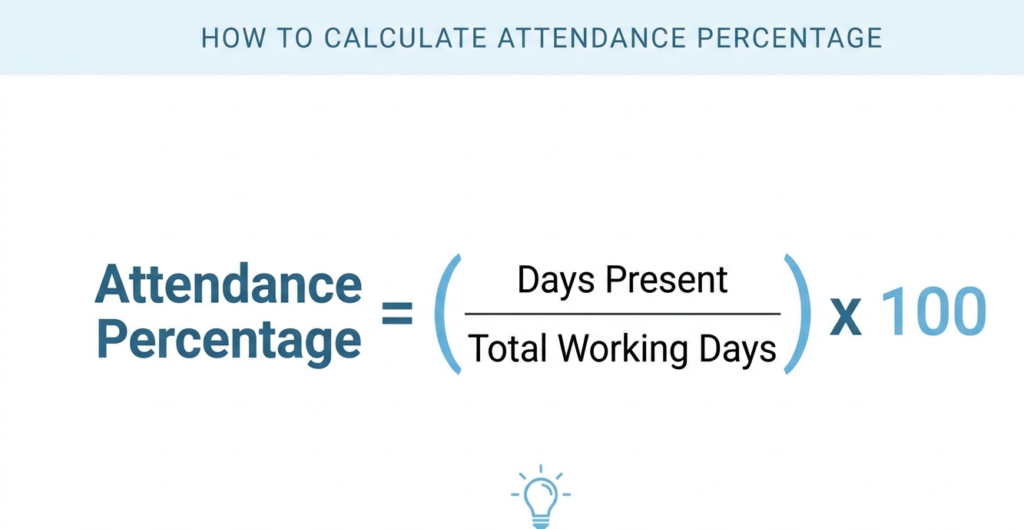
This formula works for every situation. The only variable is the numbers you put into it. Whether you are calculating it for one subject or for an entire academic year, the logic stays exactly the same.
See Also:
- How to Calculate Attendance Percentage: The Complete Guide for Students (2026)
How to type the attendance formula on keyboard
When you need to calculate attendance percentage on a keyboard inside a spreadsheet tool like Microsoft Excel or Google Sheets, you need to know which keys represent which mathematical operations. The division sign in spreadsheet formulas is the forward slash key on your keyboard. The multiplication sign is the asterisk key which is the star symbol usually found above the number 8 key on standard keyboards.
To type the attendance formula in Excel or Google Sheets, click on any empty cell and type the following. Start with an equals sign to tell the spreadsheet you are entering a formula. Then enter the cell reference for days present. Then press the forward slash key for division. Then enter the cell reference for total working days. Then type an asterisk and the number 100 for multiplication. Press Enter and the result appears instantly.
= (B2 / C2) * 100
Here B2 is the cell where you entered the number of days present and C2 is the cell where you entered the total working days. The spreadsheet will calculate and display your attendance percentage automatically. If you want to apply this formula for multiple students or employees, simply drag the formula down from the corner of the cell and it will auto fill for all rows.

Step by step example of how to calculate attendance percentage
Let us walk through a real example so you can see how the formula works in practice. Suppose a student named Riya attended 54 classes out of 72 total classes held during the semester. Here is how to calculate her attendance percentage step by step.
Days Present: 54
Total Working Days: 72
Step 1: Divide 54 by 72 = 0.75
Step 2: Multiply 0.75 by 100 = 75
Attendance Percentage = 75%
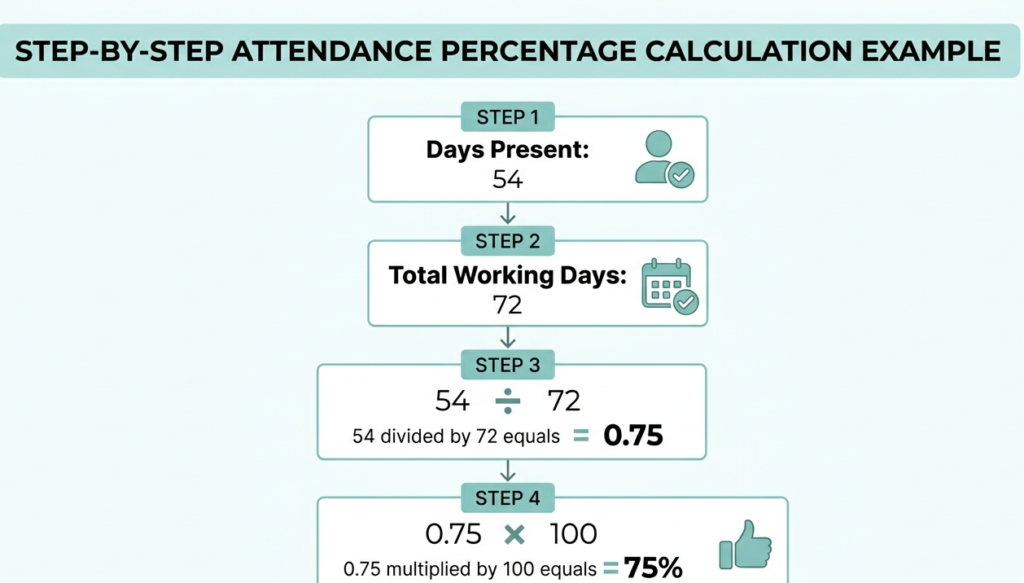
Riya has exactly 75 percent attendance. Most colleges in India require a minimum of 75 percent attendance to be eligible for examinations. So she is right at the minimum and cannot afford to miss another class without falling below the required threshold.

Quick tip: If your result is a decimal like 0.75 and not a percentage like 75, it means you forgot to multiply by 100 at the end. Always include the multiplication step.
How to calculate minimum days required to reach a target percentage
Many students want to know how many more classes they need to attend to reach the required percentage. There is a reverse formula for this. You multiply your target percentage by the total number of days and divide by 100. Then subtract the number of days you have already attended. The result tells you how many more days you must attend.
Minimum Days Needed = (Target% x Total Days / 100) – Days Already Present
For example if a student has attended 40 out of 60 classes so far and wants to end the year at 75 percent when total classes will be 90, the minimum days at 75 percent of 90 equals 67.5 which we round up to 68. The student has already attended 40 so they need at least 28 more classes from the remaining 30. That means they can miss at most 2 more classes for the rest of the year.
How to calculate attendance percentage on a basic calculator
If you do not have access to a spreadsheet or computer, you can still calculate attendance percentage using any basic calculator or the calculator app on your phone. The keyboard steps on a physical calculator are simple. Press the number for days present. Then press the division key. Then press the number for total working days. Then press the equals key. Note the decimal result. Then press the multiplication key. Then press 100. Then press equals again. The final number on the screen is your attendance percentage.
Why knowing how to calculate attendance percentage matters
In most Indian colleges and universities, a student who falls below 75 percent attendance is not allowed to appear for semester exams. This is a strict rule and it can cause a student to lose an entire academic year. Understanding how to calculate attendance percentage lets you stay ahead of this situation rather than discovering the problem at the last moment when it is too late to fix it.
In corporate environments the formula is used by HR departments to track employee leave, calculate salary deductions, and assess performance. Many companies use attendance percentage as one of the metrics during appraisals. Knowing your own number puts you in control and allows you to plan your leaves wisely without crossing any limit.
Common mistakes when calculating attendance percentage
The most frequent mistake people make is entering the total working days in the numerator position and days present in the denominator position. This reversal gives a completely wrong result. Always remember that days present goes on top and total days goes on the bottom of the division. Another common error is forgetting the multiplication by 100 step which gives a decimal answer instead of a percentage. A third mistake is not counting all classes or subjects correctly which makes the base number inaccurate from the start.
Final word on how to calculate attendance percentage
The formula for how to calculate attendance percentage is one of the most useful calculations you will use throughout your academic and professional life. Divide the days you attended by the total days and multiply by 100. On a keyboard in Excel use the forward slash for division and the asterisk for multiplication. Track your attendance regularly from the start of any semester or work period so you always know exactly where you stand and never face any unpleasant surprises at the end.
Pingback: CBSE 75% Attendance Rule 2026: Complete Guide for Class 10 & 12 Board Exams - 75attendancecalculator.com
Pingback: Aggregate Attendance Meaning: Complete Guide with Calculation, Examples, Rules & Free Calculator (2026) - 75attendancecalculator.com